Take bookings on your site, with who booked kept off it
Say when you are open and what can be booked. Any page can offer the free times, and a visitor books, adds it to their calendar and can cancel, with no script and no account.
In the adminBookings
Bookings are appointments taken on the site: one calendar, its hours each week in its own time zone, the dates it is closed, and the services it offers, each with how long it takes and how long to leave after it. A booking section on any page offers the free times for one service.
Set it up
On the Bookings screen, say:
- the time zone the hours are in, such as
Europe/London; visitors are shown times on this clock, and told which it is; - the hours each day, as spans such as
09:00-12:30, 13:30-17:00, with a day left empty when closed; - the dates you are closed;
- the least notice in hours, how many days ahead you take bookings, and how long who booked is kept after the appointment (30 days unless you say otherwise);
- each service: a name for pages to use, a title, its length and how long to leave after it, in minutes, and a price to show. The price is shown, never charged.
Or from the command line:
quilzo booking example > bookings.json    # a setup to start from
quilzo booking setup bookings.json
Changing the hours or services changes what the site offers at once, as publishing does, so it takes whoever may publish. Then add a booking section to a page, naming a service, in the page's editor or with quilzo section add PAGE booking.
What a visitor sees
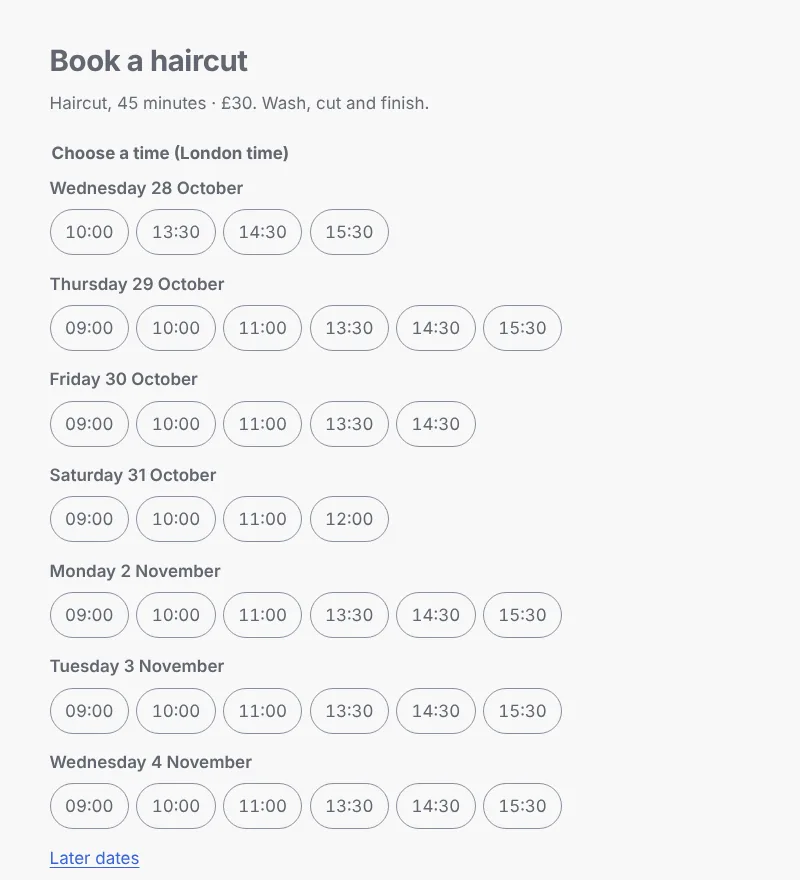
The section shows the next seven days with free times, and Later dates for more. The times are buttons with no script behind them, so they work with a keyboard and a screen reader. A visitor picks one, gives a name and an email address, and optionally a telephone number and a note, and books.
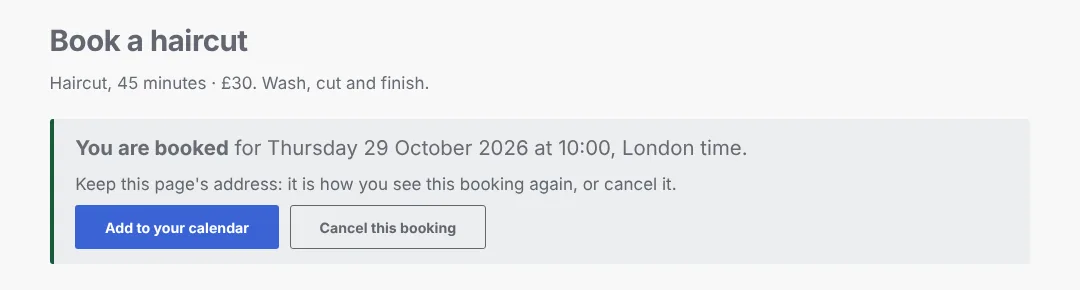
They are shown the booking on the same page, at an address only they were given. From there they can add it to their calendar, as a file every calendar reads, with the address to come back to. They can also cancel it until it starts. Nobody needs an account.
A time is free when it is within the hours, not on a closed date, not sooner than the notice, and clear of every booking and the time left after it, whatever service that booking was for. On the day the clocks change, ten o'clock is still offered at ten, and a time the clocks skip is not offered. The time is checked again as it is booked, so two visitors who saw the same free time cannot both get it.
Who booked, and where that is kept
A booking is kept as two things:
- the calendar: when, for how long and for what. The public site reads it to offer free times. It never holds a name.
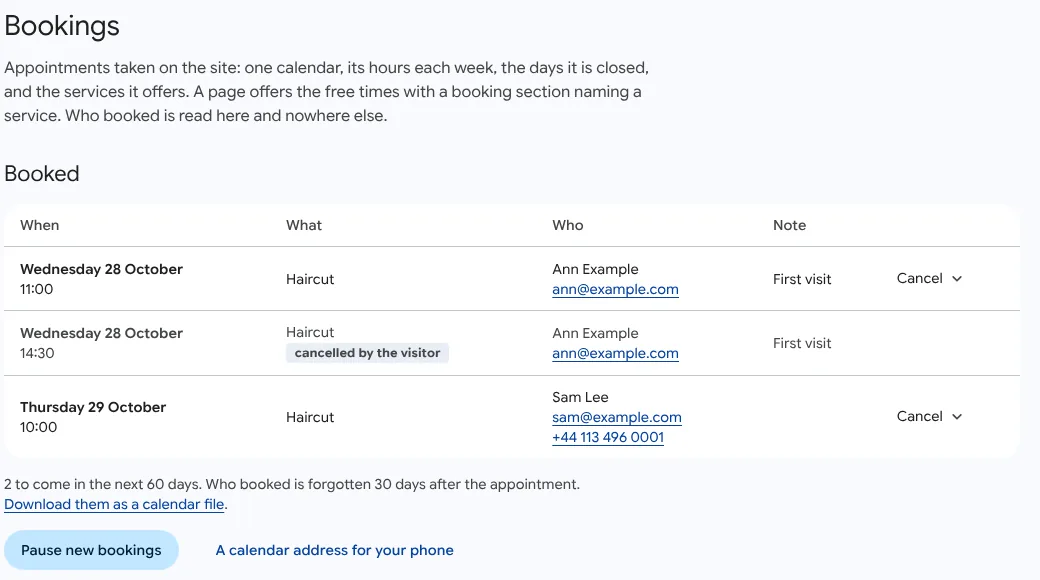
- who booked: name, email, telephone and note. The public site writes it once and cannot read it back. You read it on the Bookings screen or with
quilzo booking list, and it is forgotten the set number of days after the appointment.
So a flaw in the part of Quilzo that faces the internet could show that somebody booked a haircut at ten on Tuesday, and not who. The audit log records that a booking was made or cancelled, from where and for which service, and never by whom.
Cancel, pause, and your own calendar
| To | On the screen | Or run |
|---|---|---|
| Cancel a booking, and tell them yourself, since nothing is sent to the person who booked | Cancel on its row | quilzo booking cancel ID |
| Cancel it and forget who made it, for somebody asking to be forgotten | Forget who booked it too | quilzo booking cancel ID --erase |
| Stop taking new bookings; those made stand | Pause new bookings | quilzo booking pause, then resume |
| Take the bookings into your calendar, names and all | Download them as a calendar file | On the screen only; quilzo booking list lists them |
| Subscribe your phone to the times | A calendar address for your phone | quilzo booking feed |
The calendar address is shown once and kept only as a hash; making another ends it, and quilzo booking feed --off turns it off. It shows when each booking is and for what, never who, because the address is a secret your calendar app holds and sends over the internet.
Nothing is ever sent to the person who booked, but staff can be told of bookings made and cancelled: add booking.made and booking.cancelled to notify.events, beside the addresses in notify.staff (see Telling staff). A notice says which service and how many, never who.
The shield can turn new bookings off for a while, and a visitor is told booking is not available and to try again later: quilzo shield feature bookings --for 2h --reason "...". Bookings are judged by the same bot check as forms (see Forms).
Webhooks can be told booked and booking-cancelled (see Integrations). Each says which service, and nothing about when or who.
Agents
- Your site crew. An agent connected over MCP sees the free times visitors see with
booking_times, and never who booked. It can propose a site that takes bookings as a package with abookingsblock beside its booking page (see the site crew). Two people approve it, because it collects who booked. An upgrade keeps your calendar address and any pause you set, and a setup you made by hand is not taken over. - Your visitors' agents. A visitor's browser agent is offered the booking form as a tool, described from your setup: the service, its length, its price and the clock the times are on. The agent fills it in and the visitor books. Nothing is offered while bookings are paused.
What it is, and is not
Bookings has one calendar, taking one booking at a time, for one person or one room. Staff with calendars of their own, deposits, recurring appointments and reminders by email are not here. A site that needs those needs a booking system rather than a page.
A site made before this version renders the booking section only once it has the latest layout. To get it, choose your starter again under Design.