Connect AI apps and agents to Quilzo over MCP, with OAuth and receipts
Quilzo's operations for any agent or AI app, with each app acting for one person, with their access and no more.
In the adminConnected apps
The agent interface is Quilzo as an MCP server: the same operations, checks and audit log as the command line, for any client that speaks the Model Context Protocol. It runs over stdio for an app on the same machine, and over HTTP at /mcp (MCP revision 2026-07-28, stateless) for apps anywhere, which connect through OAuth 2.1 with a person's consent.
What an app sees
Four tools, so an app's context is not filled with dozens of definitions:
| Tool | Does |
|---|---|
quilzo_find | Finds the operation for a task and returns its exact arguments. Call it first. |
quilzo_read | Runs a read operation: read_page, search_pages, list_findings, incident_status and many more. |
quilzo_write | Changes a draft. Never publishes. What it writes is recorded as AI-generated. |
quilzo_check | Runs the checks that gate publishing: accessibility and content provenance. |
quilzo mcp --list prints every operation, read or write, with what it does. An agent cannot change who may do what, what code runs, or what the keys are, because a planted instruction in a page an agent reads is a plausible route to anything that agent can call.
Connect an app on the same machine
An app that starts MCP servers itself, such as a desktop AI app or a coding agent, runs quilzo mcp over stdio. A typical client configuration:
{
  "mcpServers": {
    "quilzo": {
      "command": "/usr/local/bin/quilzo",
      "args": ["--root", "/srv/quilzo/.quilzo", "mcp"]
    }
  }
}
It acts as whoever owns the token the command line finds: --token, then ~/.quilzo/token, then QUILZO_TOKEN. Prefer the file, at mode 0600, because every program you start inherits your environment, including the agent you are connecting. Issue the app a token of its own with only the role it needs, such as quilzo token issue desk-app --principal you --role author.
Connect apps over HTTP with OAuth
-
Turn on the endpoint
A door reached from outside is a decision, so it is off by default and turning it on needs a recorded reason. Apps sign in by themselves once the admin's public address is set.
quilzo config set mcp.remote true --accept-risk "AI apps on the help desk connect over MCP"
quilzo config set admin.base_url https://quilzo.example.com
Quilzo then publishes its OAuth metadata at
/.well-known/oauth-protected-resourceand/.well-known/oauth-authorization-server, with PKCE (S256), refresh tokens, revocation and client ID metadata documents. -
Decide which apps may ask
An app identifies itself by a document it publishes at an address of its own. Only apps published from hosts you allow can ask anybody here to connect, under Which apps may connect on Administration › Connected apps:
quilzo apps allow claude.aiAn app that cannot publish its own metadata, such as one you wrote, is registered instead, and gets a public client ID (no secret, PKCE required):
quilzo apps register "Desk Assistant" --redirect http://127.0.0.1:18899/callbackregistered Desk Assistant client_id qzc_aabd40e78497aec0 a public client: no secret; PKCE with S256 -
A person agrees, for themselves
Give the app the address of
/mcp. It sends the person to Quilzo, who sees who the app says it is, where it will send them back, what it will reach, and what it may do, and chooses which of those to allow.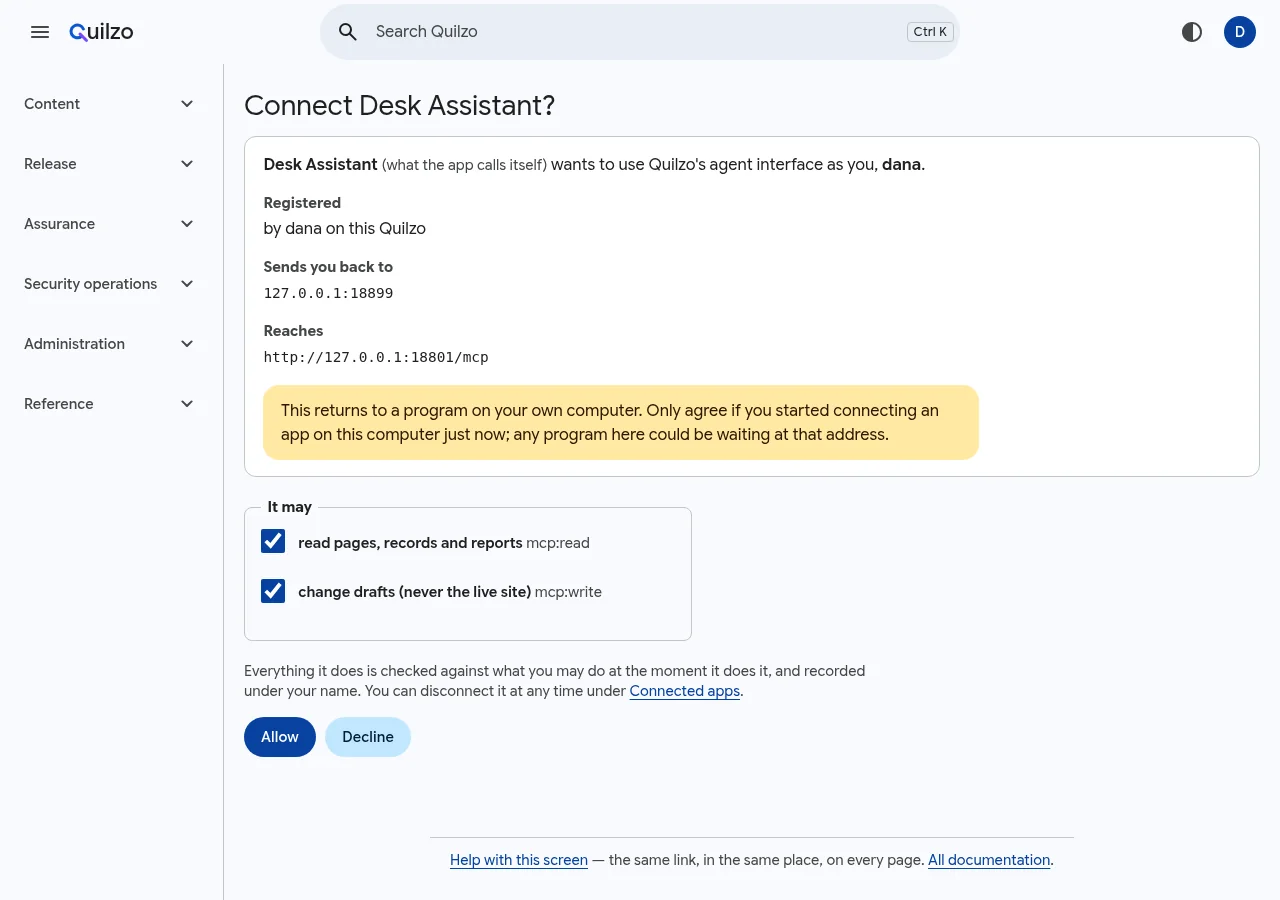
The consent screen. A warning appears when the app returns to a program on this computer. Scope The app may mcp:readRead pages, records and reports. The default. mcp:writeChange drafts, never the live site. mcp:publishPublish. mcp:adminEverything an administrator can do through the interface. A scope never adds to what the person may do. Everything the app does is checked against the person's access at the moment it does it, and recorded under their name.
-
Watch, prove and disconnect
Administration › Connected apps lists every connection: the app, who it acts for, what it may do, when it was last used, and when the person will be asked again.
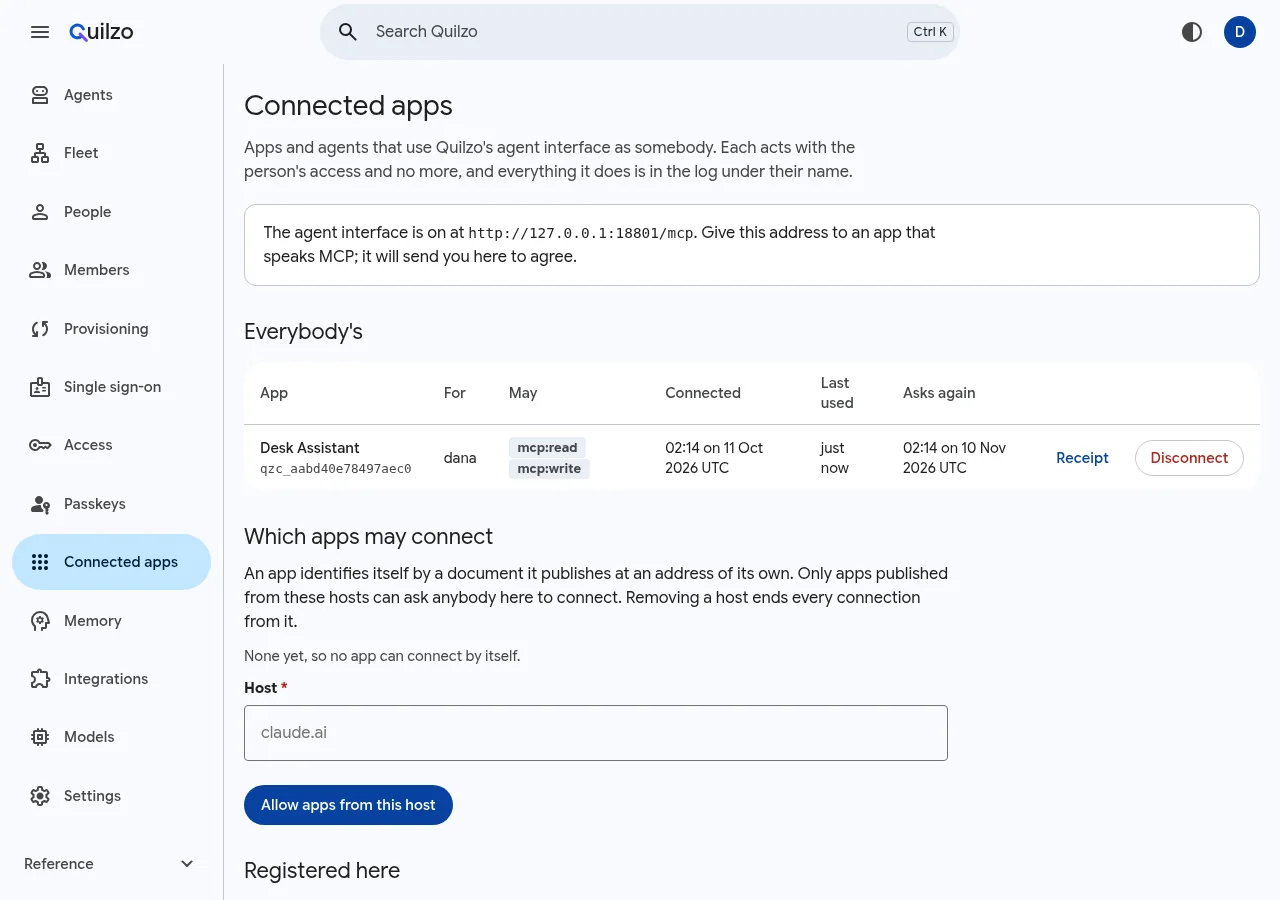
One connection, with its receipt and a way to end it. quilzo apps list quilzo apps receipt gr_783e6202940b7042 -o app-receipt.json quilzo apps disconnect gr_783e6202940b70423 records of connection gr_783e6202940b7042, each with its proof, against a head of 179 signed by 0e667cb95d838091
Ask what an app could do
quilzo apps could gr_783e6202940b7042 publish
quilzo apps could gr_783e6202940b7042 write_page returns
no Desk Assistant, for dana, could publish
this app was given author access, and this needs publisher
yes Desk Assistant, for dana, could write_page returns
then: it is recorded as Desk Assistant acting for dana (mcp.call), and quilzo apps receipt gr_783e6202940b7042 proves every callThe app itself gets the same answer when it tries: a call outside its scope returns HTTP 403 with that reason, which an MCP client knows how to answer by asking the person for more.
What a request looks like
Revision 2026-07-28 is stateless: there is no session and no handshake. Each request carries the protocol version in a header and in _meta, and repeats the method and tool name in headers so a gateway can decide without reading the body. Quilzo refuses a request whose headers and body disagree. Clients of the 2025 revisions, which open with initialize, are still answered.
POST /mcp
Authorization: Bearer ACCESS_TOKEN
MCP-Protocol-Version: 2026-07-28
Mcp-Method: tools/call
Mcp-Name: quilzo_read
{"jsonrpc": "2.0", "id": 1, "method": "tools/call",
 "params": {"name": "quilzo_read",
            "arguments": {"operation": "read_page", "arguments": {"page": "delivery"}},
            "_meta": {"io.modelcontextprotocol/protocolVersion": "2026-07-28"}}}
A token is accepted only in the Authorization header, never in the URL, because URLs end up in logs.
When a person leaves
A connection acts for one person, so it ends with their access. Once somebody is suspended, for example by the identity provider through SCIM, their apps get no new tokens and every call is refused as theirs would be. Removing a host from the allowed list ends every connection from it, and the shield can suspend a single connection that misbehaves.