MCP gateway: govern the tools AI agents call, with pinning and approvals
Agents call only the tools a person agreed to, as those tools were on the day they agreed, and other vendors' agents reach your tool servers only through Quilzo.
In the adminIntegrations
An MCP gateway sits between AI agents and MCP servers and decides each tool call: who may call which tool, how often, whether a person approves it first, and with which credential. Quilzo is one for its own agents, and offers the same to other vendors' agents at /mcp/gateway/NAME.
Declare a tool server
-
Write the declaration
Declarations live in
integrations.jsonin the store. Each names one host, why this install reaches it, and the tools it may call there. Everything is off until somebody turns it on, so an example pasted from somewhere does nothing by accident.{ "declared": [ { "name": "tracker", "kind": "mcp", "enabled": true, "purpose": "File and read issues in the support tracker", "endpoint": "tracker.example.com", "uses": ["list_issues", "create_issue"], "writes": true, "secret": "tracker-token" } ] }Field Means endpointExactly one hostname, or an IPv4 address: no scheme, no wildcard. Quilzo always uses https. port,pathWhere on that host the server answers, when it is not port 443 and /. Most MCP servers answer at/mcp.usesThe tools this install may call there. Never "everything the server offers": a server can add or redefine a tool after the day you trusted it. writesThe tools change something on the far side, so a reviewer does not have to guess from their names. secretThe name of the credential, never its value: the store keeps history that cannot be deleted. Keep the value sealed with quilzo secret set tracker-token < file, or setQUILZO_SECRET_TRACKER_TOKEN(the name in capitals, with anything else turned into_), which wins when both are there.quilzo integrations listtracker mcp enabled File and read issues in the support tracker reaches tracker.example.com may call list_issues, create_issue changes something on the far side -
Look at what the server offers, and pin it
quilzo integrations tools trackerasks the server what it offers and marks what you agreed to. The difference between the two lists is worth reading. When you are satisfied, pin the tools: Quilzo records a SHA-256 of each tool's definition (name, description and input schema) as the server gave it that day.quilzo integrations tools tracker quilzo integrations pin tracker list_issues create_issueA pinned tool whose definition later changes is refused until a person pins it again, and the shield is told. This is the answer to tool poisoning: a name staying the same is not the tool staying the same. Only a pinned tool can be chosen by a model.
-
Check it in the admin
Administration › Integrations shows each server, what it may call, how it authenticates, and whether it is offered through the gateway.
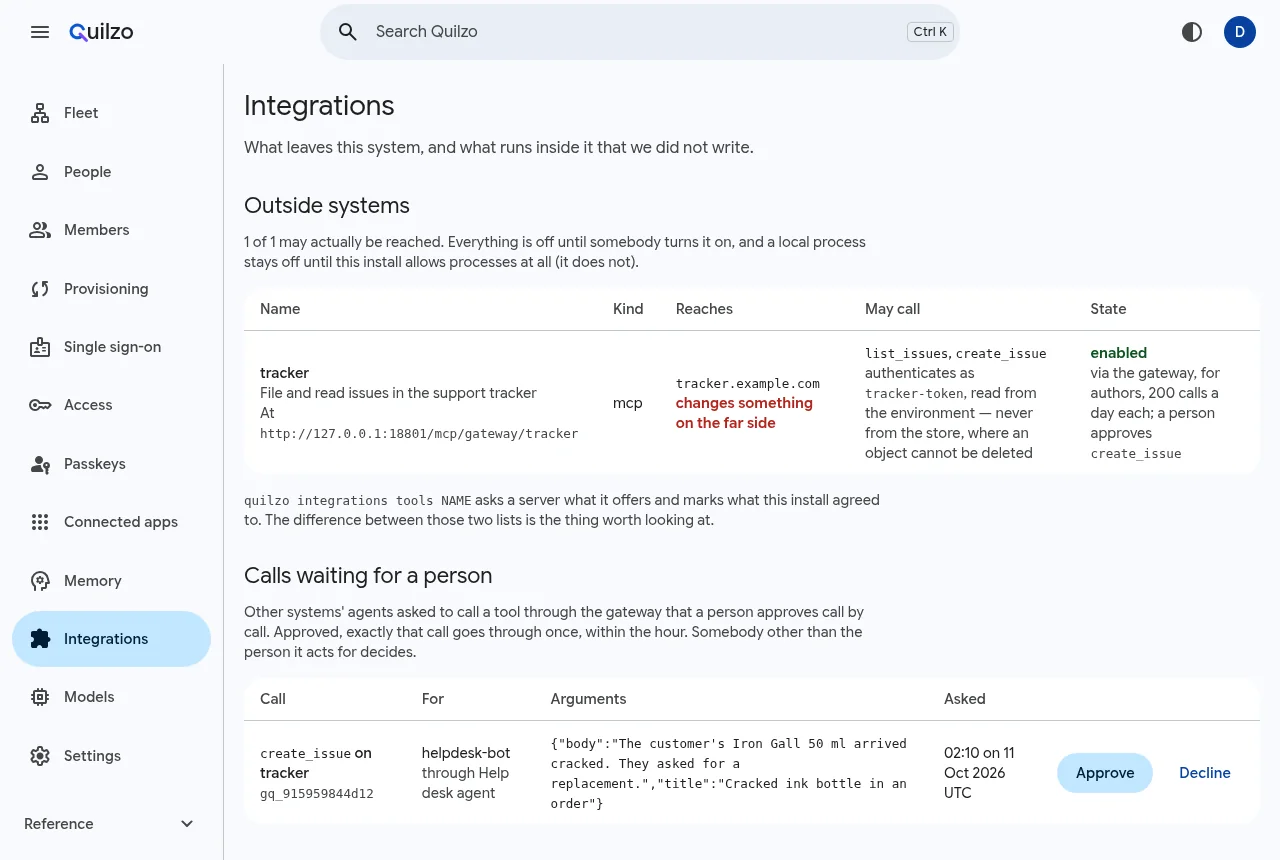
A declared tool server, offered through the gateway. The waiting call shown is sample data in the program's own format.
A REST API, from its OpenAPI description
An API with no MCP server is declared from its OpenAPI 3 document (JSON). Each operation becomes a tool by its name, with the same allow-list, pins, gateway and approvals as an MCP server's tools. Import once to see what is on offer, then again naming what this install may call:
quilzo integrations import billing-openapi.json
quilzo integrations import billing-openapi.json --uses getInvoice,listInvoices --secret billing-key
The declaration arrives switched off, with only the named operations, as kind http: each one's method, its path under the endpoint, and its path and query parameters. A bearer token, or an API key in a header the document names, comes from the secret, never from the agent.
An operation that spends money declares pays: where its amount, currency and payee are, so each payment is checked against the agent's mandates (see agents that pay).
| A call | Is |
|---|---|
| Built | Only from what its operation declares. An argument it does not declare is refused rather than passed on, and path values are escaped. |
| Sent | Over https, to the declared host and nothing else, with no redirects followed. |
| Answered | Up to 32 KiB of the response, or the status and the start of the error. |
| Changed | An operation edited after it was pinned is refused until somebody pins it again. |
An import never fetches what a document refers to: a reference outside the document is named and left out. Header and cookie parameters, and an API key in a query string, are not imported. A REST API can be offered to other vendors' agents through the gateway like an MCP server.
An MCP server from the registry
A server's server.json from the MCP registry becomes a declaration of its Streamable HTTP address. Without --uses the server is asked what it offers and nothing is declared:
quilzo integrations import server.json
quilzo integrations import server.json --uses list_issues,create_issue --secret tracker-token
A server published only as a package runs on your side first; give its address with --endpoint.
Let an agent use a tool
An agent names each tool it needs, on its host, with a purpose, in its declaration. Tools that change something can ask first:
"tools": [
  { "name": "list_issues", "host": "tracker.example.com", "purpose": "see whether a problem is already reported" },
  { "name": "create_issue", "host": "tracker.example.com", "purpose": "report a problem it finds", "writes": true }
],
"ask_first": ["create_issue"]
A call is allowed only if the agent declares the tool, an enabled integration offers it, and it is pinned. Every call is recorded, and the exfiltration breaker stops a call when the run holds something private and has read somebody else's words (see Limits that hold). Try a call by hand with quilzo integrations call tracker list_issues.
A tool server on your own network
Quilzo refuses private, loopback and link-local addresses unless you say otherwise, so a declaration cannot be pointed at whatever else is inside your network. To use an MCP server that runs inside it, name the range it is in with reach:
{
  "name": "knowledge",
  "kind": "mcp",
  "enabled": true,
  "purpose": "Search the internal knowledge base",
  "endpoint": "kb.corp.example",
  "port": 8443,
  "path": "/mcp",
  "reach": ["10.20.0.0/16"],
  "uses": ["search"]
}- Every address the name resolves to must be inside a declared range. Quilzo checks this when it connects, so changing a DNS answer later does not let the declaration reach anything else.
- Only private ranges (
10.0.0.0/8,172.16.0.0/12,192.168.0.0/16,100.64.0.0/10,fc00::/7) and loopback can be named. Link-local, where cloud metadata lives, never can. Up to 8 ranges, each written from where it starts. - The server still needs https. If your organisation signs its own certificates, the machine running Quilzo has to trust that authority, through the system's certificate store or
SSL_CERT_FILE. - In an offline deployment (
network.modeset to offline) only loopback is reached, whatever is declared.
The Integrations screen and quilzo integrations list show the range next to the server, so a reviewer sees what was opened.
Offer your MCP servers to other agents
Another vendor's agent, or one your teams built, can reach a declared server through Quilzo instead of directly. It gets only the pinned tools, at the role and daily limit you set, with Quilzo's credential injected and never its own. Every call is checked, counted and recorded with a digest of its arguments.
-
Turn the gateway on for one server
quilzo integrations gateway tracker --role author --daily 200 --ask create_issue--roleis the least role a caller needs (reader, author or publisher).--dailycaps one caller's calls a day (500 if you name none).--asklists tools a person approves call by call.--offstops offering it. -
Give the caller the address and a token
The server is offered at
https://YOUR-ADMIN/mcp/gateway/tracker. A caller authenticates with a Quilzo token or an OAuth connection (see Connect AI apps), and is limited by that principal's access. -
Decide the calls that wait
A call to a tool under
--askwaits under Calls waiting for a person. Approved, exactly that call goes through once, within the hour. Somebody other than the person it acts for must decide.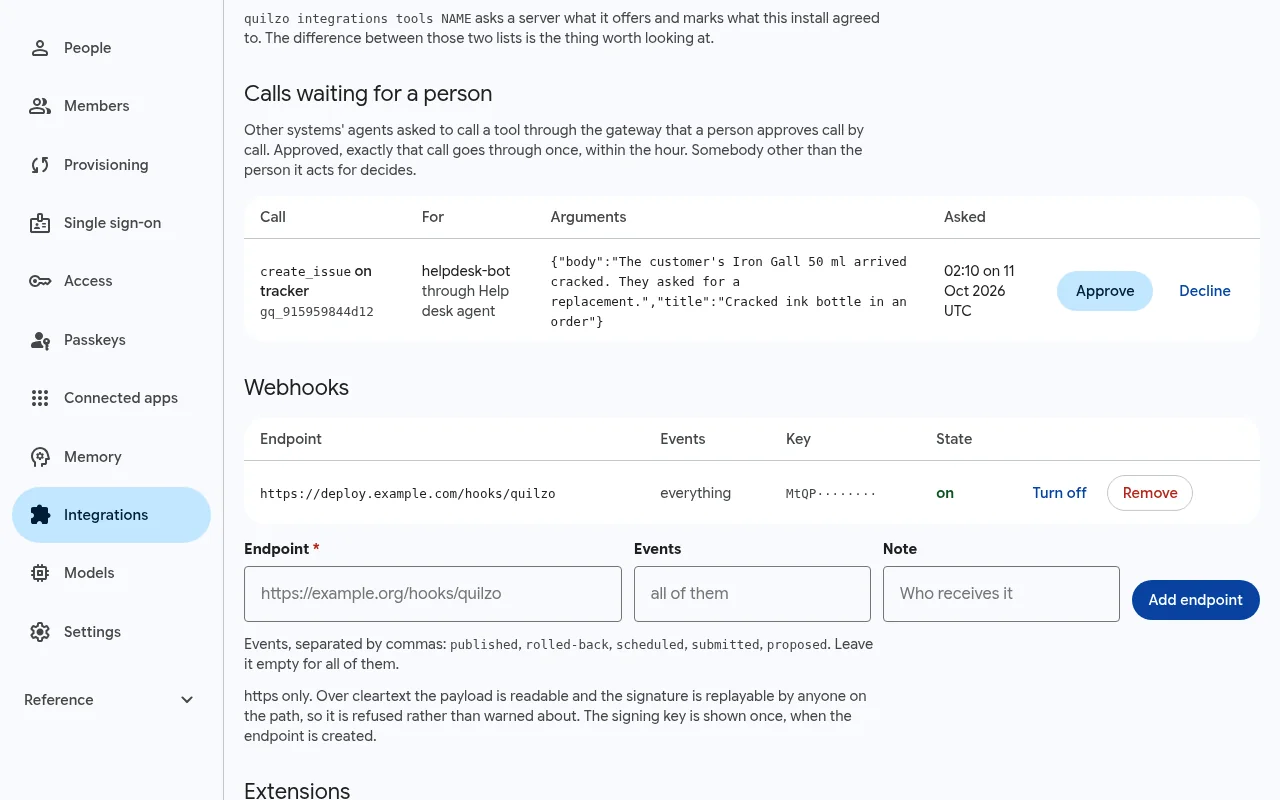
A call waiting for a second person (sample data). quilzo integrations held quilzo integrations approve gq_915959844d12 quilzo integrations decline gq_915959844d12
Every caller of the gateway, and every tool server, also appears on the Fleet map.
Tell other systems when something happens
A webhook is a signed POST to a URL you choose when something is published, rolled-back, scheduled, submitted (a form) or proposed (a change waiting for approval). Only https endpoints are accepted.
quilzo webhook add https://deploy.example.com/hooks/quilzoThe signing key is printed once. Each delivery carries X-Quilzo-Event, X-Quilzo-Delivery, X-Quilzo-Timestamp and X-Quilzo-Signature. The signature is an HMAC-SHA256 over the timestamp and the body, each prefixed with its length, so the boundary between them cannot be moved. Reject anything more than five minutes old. A receiver in Python:
import hmac, hashlib, struct, time
def verify(key, timestamp, body, signature, now=None):
    if abs((now or time.time()) - int(timestamp)) > 300:
        return False                      # too old or from the future: a replay
    mac = hmac.new(key.encode(), digestmod=hashlib.sha256)
    for field in (timestamp.encode(), body):
        mac.update(struct.pack(">Q", len(field)) + field)
    return hmac.compare_digest("v1=" + mac.hexdigest(), signature)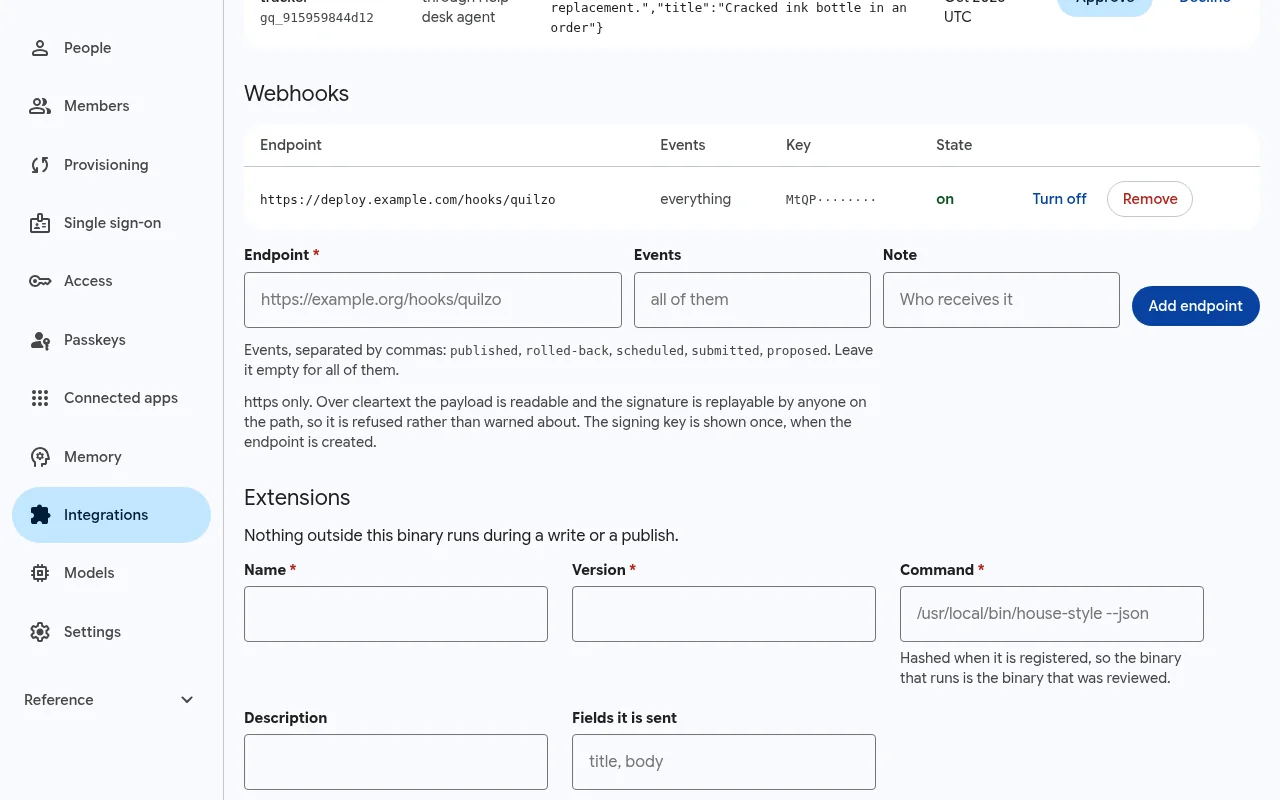
quilzo webhook list, webhook test and webhook remove ID manage them.
Traces and the audit log, to your own tools
Set telemetry.otlp_endpoint and every agent run is sent as OpenTelemetry spans using the GenAI semantic conventions (gen_ai.operation.name, gen_ai.tool.name and the rest) to the collector you already run.
The audit log exports to a SIEM as OCSF (the default), CEF or JSON Lines. --envelope writes every exported event's hash, in order, beside the export, so the receiving side can tell whether anything was added, removed or reordered:
quilzo siem ocsf --envelope envelope.json > audit.ocsf.jsonl
quilzo siem jsonl --envelope evidence.json > audit.jsonl
quilzo siem verify audit.jsonl --envelope evidence.json
verified 185 event(s), sequences 1-185
nothing was added, removed, reordered or altered since exportAn OCSF or CEF record carries its event's hash (metadata.uid, or cs3 in CEF) rather than the whole event, so compare those with the envelope. A JSON Lines export carries each event whole, which is what siem verify recomputes; keep one of those as evidence.