Today, the first screen after signing in
What is waiting for you, then what is happening in the parts of the store you work in.
In the adminToday
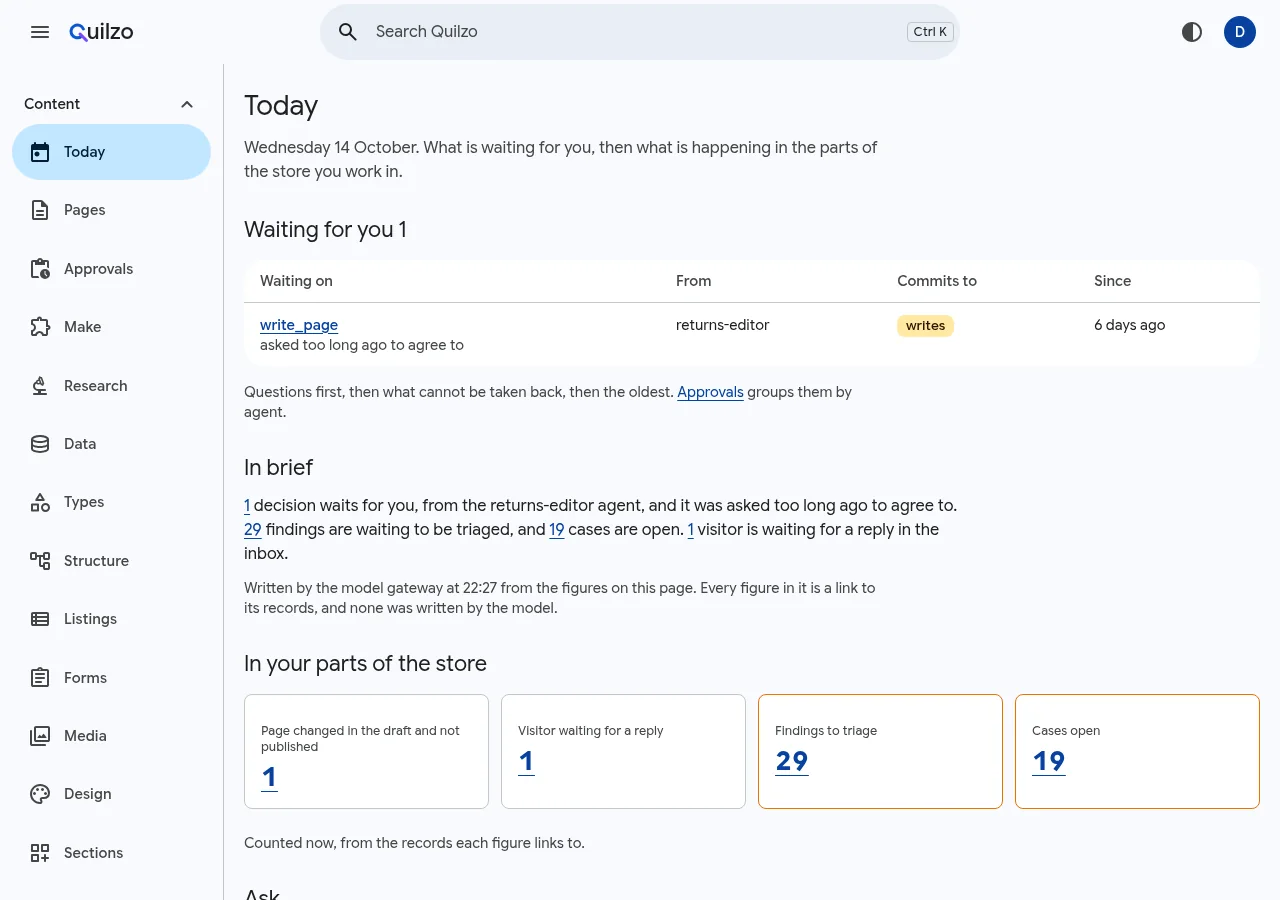
Signing in opens Today, after Get started until you dismiss it. It has the same parts every day: what is waiting for you, a brief when a model is set up, and counts from your parts of the store.
Waiting for you
Everything you may decide, from every part of Quilzo: what agents asked, calls held for a second person, changes waiting for review, acts on other tools, held memories and features waiting to be installed. It lists the same items as Approvals, in this order:
- what was asked too long ago to agree to, so it stops holding its run;
- by what deciding commits to: questions, installs, then paying, deleting and publishing, which cannot be taken back, then sending, writing, acting and reading;
- the oldest first.
The first seven are shown, with a link to the rest on Approvals.
In brief
A few sentences on what matters most, written by the configured model below what is waiting. The model never writes a figure:
- it is given the figures, each with a placeholder, and refers to one only by its placeholder; Quilzo puts in the figure, as a link to its records;
- a sentence with a number or a number word of its own, a link or markup is left out, and at most three are kept;
- it is given counts, kinds of decision and agents' names, never anything somebody else wrote: no agent's question, visitor's message, finding's title or log line.
The brief says which model wrote it and when, and whether the figures have changed since. It is written on your first visit of the day and again when the figures change, at most every half hour, through the model gateway, and charged to your own budget. Somebody whose only access is to read the evidence and the log, such as an auditor, is not given one. Turn briefs off for everybody with:
quilzo config set today.brief falseIn your parts of the store
A count for each part of the store you can open, taken when the screen is loaded. Each count links to the records it counts:
| Count | Shown to whoever can open |
|---|---|
| Pages changed in the draft and not published, among those you may read | Review |
| Agent runs going now, finished in the last day, and failed, refused or stopped in the last day | Agents |
| Visitors waiting for a reply | Inbox |
| Findings to triage | Findings |
| Cases open | Cases |
The same grant check that decides the menu decides each count, so an analyst sees findings and cases and no pages, and a count is never shown for a screen you cannot open.
Ask, and keep the answer
Somebody who may use the store's models (the use-models permission, which comes with author) can ask Today a question in their own words. The answer is cards Quilzo draws:
| Card | Shows |
|---|---|
| Figure | How many records match, or the total, least or most of a number field |
| Table | The records that match, up to five fields and twenty-five rows |
| Bars | How many matching records have each value of a field |
| Waiting | Decisions waiting for you, optionally of one kind |
| Runs | Agent runs in the last days, by agent and outcome, for whoever manages agents |
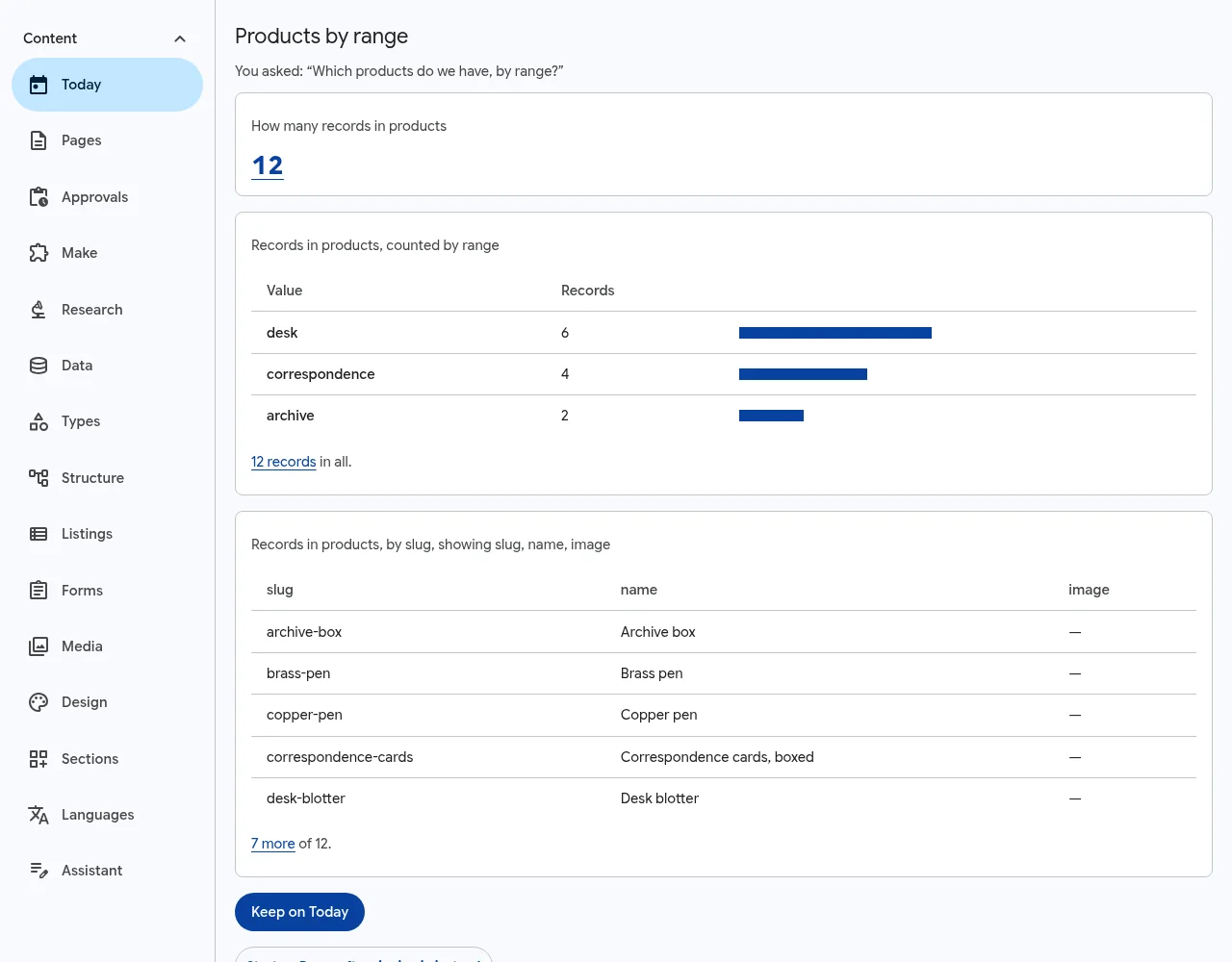
The model is told the collections you may read, by their fields and choices, and the agents you manage, and it chooses the cards and what each counts. It never sees a record. Each card is checked as a listing is, filled in from what you may read, and says in words what it counted, so you can check the question that was asked of your data as well as the answer. A card naming a collection you may not read, a field its type does not have, or anything outside the cards is left out, and the answer says so.
Keep on Today pins the answer as one of Your views, drawn again on every visit from what you may read then; Today keeps twelve. Asking is charged to your own budget through the model gateway. Turn it off for everybody with quilzo config set today.ask false.
Where you start
Choose Start on Pages after signing in instead at the foot of Today to land on Pages, as before; Today stays in the menu, and Start here after signing in changes it back. The choice is kept in your browser, like the order of your menu.