LLM gateway: model routes, budgets in money and a privacy guard, for any AI agent
One gateway for every model call: which model answers, what each caller may spend, and what may leave in a prompt.
In the adminModels
The model gateway is where every model call from Quilzo goes: agents, chatbots, the writing assistant, analyst triage, and agents' own programs. It tries routes in order, charges each call to a caller at that route's prices, holds callers to their budgets, and masks personal data before a prompt reaches a route that may not receive it. Prompts are never recorded, only who asked, which route answered, and how much. AI agents built in any framework can use it too, with their memory (see Agents built anywhere).
The quickest start: one model
With no routes declared, every call goes to the model in two environment variables. Any OpenAI-compatible endpoint works: Ollama, vLLM, LM Studio, llama.cpp, or a hosted provider.
export QUILZO_MODEL_URL=http://127.0.0.1:11434/v1
export QUILZO_MODEL=llama3.1
A key, if the endpoint needs one, goes in QUILZO_MODEL_KEY. Quilzo sends a key only over https, or to a model on this machine.
Add routes, in fallback order
-
Add each model as a route
Open Administration › Models and fill in Add a route: a name, the address, the model name, the environment variable holding its key (never the key itself), and what a million tokens cost there. Or:
quilzo gateway currency GBP
quilzo gateway route add on-premises --url http://127.0.0.1:11434/v1 --model llama3.1 \
  --personal --price-in 0.05 --price-out 0.20 --first
quilzo gateway route add hosted --url https://models.example.com/v1 --model example-large \
  --key-env EXAMPLE_API_KEY --price-in 2.50 --price-out 10.00
Mark a route
--personalonly if it may receive personal data: it runs on your own machines, or you have an agreement with the provider to process it. Text for any other route has personal data masked on the way out. A picture, such as a screenshot an agent takes, cannot be checked, so it goes only to a route marked--personal. -
Check the order
Routes are tried in the order shown. A route that fails three times in a row rests for a minute while the next one answers. Try first moves a route to the top.
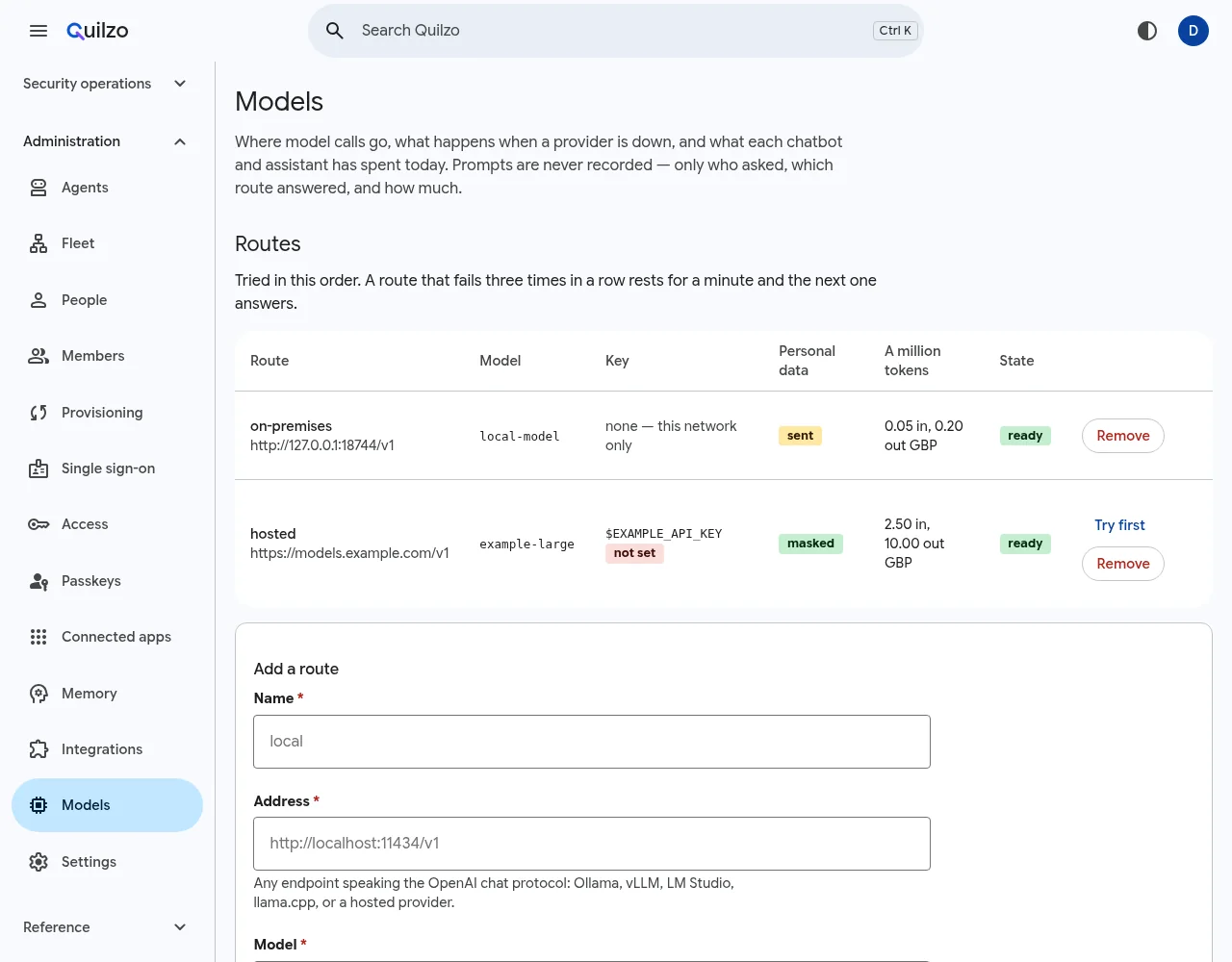
Two routes. Personal data is sent to the first and masked for the second. -
Set budgets
Under Budgets, give a caller limits per minute, per day and per month: calls, characters, tokens and money. A caller is
agent:NAME,person:NAME,chatbot:NAME,door:NAMEfor a person's agents built elsewhere, or*for everybody without a budget of their own.quilzo gateway budget agent:returns-editor --money-per-day 5.00 --money-per-month 60.00 quilzo gateway budget agent:concierge --per-minute 20 --tokens-per-day 200000 quilzo gateway budget '*' --money-per-day 20.00A chatbot over its daily budget answers from its pages without the model, which gives a plainer answer rather than an outage. Each agent run also has its own cap in its declaration (see Limits that hold).
-
Watch what each caller spent
Today shows every caller's characters, tokens, money, calls, failures and refusals, for the day and the month.
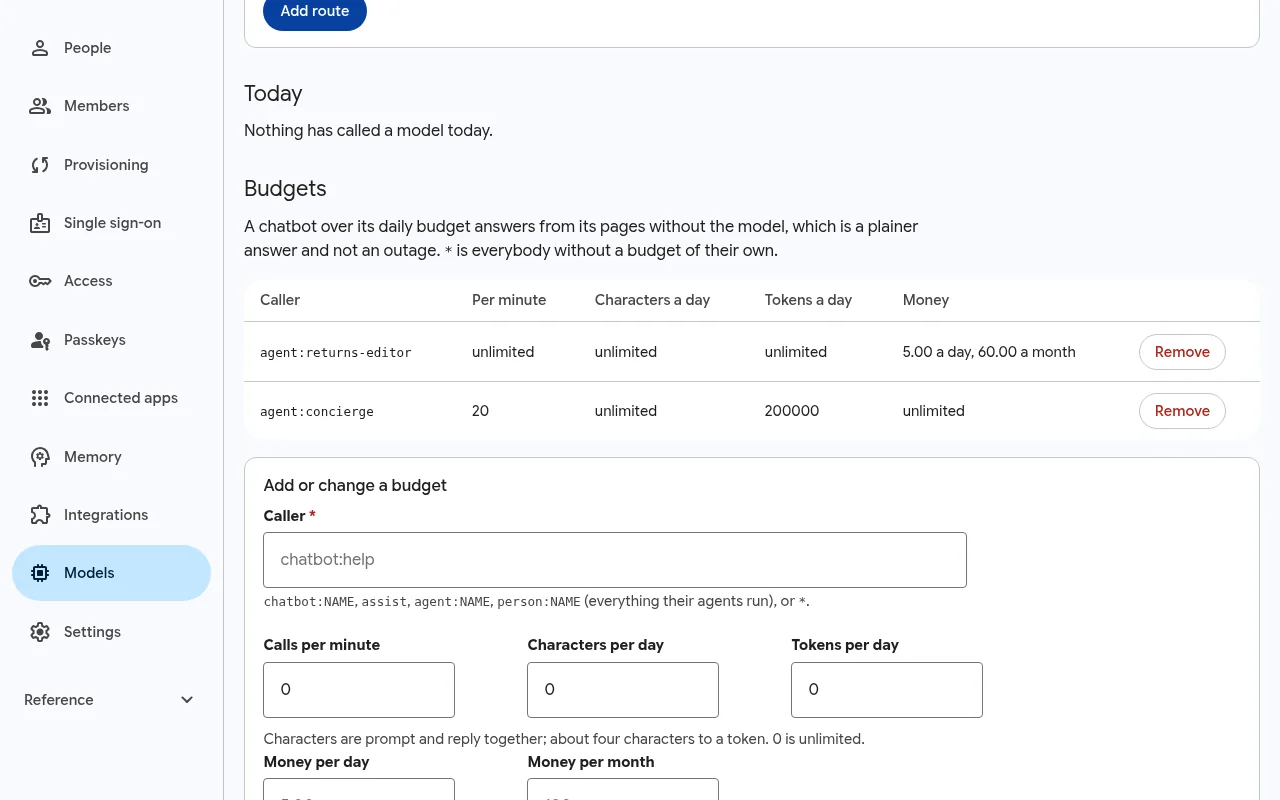
Spending by caller, against their budgets. quilzo gateway statusroutes, in fallback order on-premises http://127.0.0.1:11434/v1 llama3.1 no key needed; may receive personal data hosted https://models.example.com/v1 example-large key in $EXAMPLE_API_KEY; personal data masked today agent:returns-editor 4463 characters no daily limit, 3 call(s), 0 failed, 0 refused 1112 tokens, 0.000067 GBP today of 5.00, 0.000067 this month of 60.00
The privacy guard
Before a prompt leaves for a route that may not receive personal data, Quilzo replaces each personal value with a placeholder such as <quilzo:email:1>. The same value gets the same placeholder every time, so the model can still tell one customer from another. The placeholders are swapped back in the answer, so it reads as if nothing was taken out. The model never sees a value, and the record of what was masked holds only counts by kind.
| Masked | For which routes |
|---|---|
| Email addresses (except your own site's domains), telephone numbers, IBANs | Routes not marked --personal |
| National identity numbers: US SSN, UK National Insurance, Spanish DNI and NIE, Indian Aadhaar, Brazilian CPF, Canadian SIN, each checked with its own rules | Routes not marked --personal |
| Payment card numbers and credentials (API keys, tokens, private keys) | Every route, including personal ones |
A credential caught in a prompt is also a sign that a key was pasted somewhere it should not have been, so the shield's secret-in-prompt playbook opens a case for somebody to look at it and rotate it (see The shield). A hosted route allowed to receive personal data is a posture finding until an agreement is on record.
Invisible text never reaches a model
Characters that draw nothing, such as the Unicode tag block, zero-width characters and bidirectional controls, are taken out of every text before any model reads it. They are a known way to hide an instruction from the person reviewing a page while a model still reads it.
Agents built anywhere
An AI agent made with any framework talks to its model in OpenAI's shape or Anthropic's. Quilzo answers both at /v1 on the admin, through this gateway: the provider's key stays in Quilzo, and each call is charged to the person whose Quilzo token the agent carries, against their budget, with personal data masked and invisible text taken out, and recorded in the signed log. The agent changes its base address and its key, nothing else.
-
Turn it on
It is off until an administrator turns it on, with a reason the log keeps:
quilzo config set models.remote true --accept-risk "support agents built in LangGraph use our models"It answers only in a store with an access policy, and only for a token whose person may draft (author or above).
-
Give the agent a token as its key
quilzo token issue support-agent --principal dana --role authorClient Base address Endpoint OpenAI's chat completions https://YOUR-ADMIN/v1POST /v1/chat/completionsOpenAI's responses https://YOUR-ADMIN/v1POST /v1/responsesAnthropic's messages https://YOUR-ADMINPOST /v1/messagesThe key goes where each client puts it:
Authorization: Bearerorx-api-key. A token an app was given through OAuth for/mcpdoes not work here, and neither does a browser session. -
Name a model
quilzois the gateway, which picks the route.agent/NAMEnames one of this store's agents and brings its memory.GET /v1/modelslists what the token may name.
import os
from openai import OpenAI
client = OpenAI(base_url="https://quilzo.example.com/v1", api_key=os.environ["QUILZO_TOKEN"])
reply = client.chat.completions.create(model="agent/concierge",
    messages=[{"role": "user", "content": "When does my team ship?"}])
Each framework's own lines are on Agent frameworks.
Memory at the gateway
Naming an agent that declares memory (see Agent memory) works as a run of that agent does, under its declaration as bounded for the token's person:
- With
recall, what it remembers about the person is put into the conversation before the model reads it, marked as information and not instructions: what matches what the person said, then its most recent facts about them. - With
remember, the model is offered one tool,quilzo_remember. Quilzo performs it and asks the model again, so the agent gets an answer and never sees the tool. A fact with a key replaces the older one. - Quilzo cannot see what an agent built elsewhere read, so what it remembers is kept as unreviewed, at most 30 days. When the conversation carried a tool's results or a picture, it is held until a person confirms it, the same rule as a run here.
The person sees and forgets all of it on the Memory screen, as with any agent.
What it charges, records and refuses
- A call is charged twice, each against its own budget: to
door:PERSON, or toagent:NAMEwhen an agent was named, and toperson:PERSON. Set a budget for either as for any caller (see Add routes, in fallback order). - Every call, refusals included, is a
model.doorrecord: who it acted for, which agent, the tokens, and the ids of what was recalled and remembered. Never the conversation. - Refused, with the reason: a picture given as a web address (the provider would fetch it), a tool the provider runs itself, and a responses request continuing a conversation kept elsewhere (
previous_response_id). Nothing here keeps conversations, so an agent sends the whole of it each time, as every SDK can. - A request that asks for a stream gets the whole answer as one stream, in the events its client expects.
- The shield can turn it off for a while (
models), as it can the agent interface.